
Last updated: August 11, 2026
- Key Facts – A useful migraine trigger tracking app should log sleep, meals, stress, medication, and symptoms in less than 1 minute.
- The strongest options usually let you log an attack in under 1 minute, compare patterns across weeks, and export a report for a clinician.
- – Migraine logs can include sensitive data such as menstrual timing, medications, and work schedules.
- – The American Migraine Foundation and NINDS both recommend tracking symptoms and triggers as part of migraine self-management.
Quick Answer: The best migraine trigger tracking apps are the ones you will actually use on a bad day. The strongest options usually let you log an attack in under 1 minute, compare patterns across weeks, and export a report for a clinician.
Key Facts
– A useful migraine trigger tracking app should log sleep, meals, stress, medication, and symptoms in less than 1 minute.
– Export options such as PDF or CSV help turn app notes into a doctor-ready summary.
– Migraine logs can include sensitive data such as menstrual timing, medications, and work schedules.
– The American Migraine Foundation and NINDS both recommend tracking symptoms and triggers as part of migraine self-management.
– For short-term tracking before an appointment, a simple diary may be enough.
– If an app is too slow, users often stop logging within days, which makes the data less useful.
Migraine trigger tracking apps should help you spot patterns, not just log headaches. No connection to sleep, meals, stress, hormones, weather, or medication timing? Then the app is mostly a diary with a prettier screen.
I write about migraine tools with one goal in mind: helping people choose something they will still use on a bad week, not just on day one. For migraine trigger tracking apps, the right choice depends on whether you need quick logging, pattern analysis, or something you can bring to a neurologist.
The Real Difference Between a Simple Migraine Diary and a Trigger Tracking App
A diary records what happened; a trigger tracking app helps you ask why it happened. Small distinction. Big payoff. A plain diary is useful if you only need a record of attack days, pain severity, and medication use. A trigger tracker becomes more valuable when it turns those entries into patterns you can act on.
So I would choose a trigger tracking app over a basic diary when you are still in the “What is setting this off?” stage. This is where the extra features matter: fast symptom entry, flexible trigger tags, calendar views, and summaries that show repeated overlaps. If an app only lets you tap “headache” and move on, you may collect data you never learn from.
Honesty helps here. Migraine memory gets patchy once the pain lifts. A useful app makes logging take seconds, because less friction usually means a fuller record. You should also be able to note things that do not fit a neat menu: missed meals, an unusually long screen day, travel, dehydration, bad sleep, menstrual timing, or a medication change. Those messy details are often where the clue lives.
Because app data can be misleading, context matters as much as the chart. A bad app may show a correlation that is really coincidence. This is why strong features are not just charts; they are context, export options, and enough flexibility to compare your own patterns over time. For medical guidance, I would treat app findings as a starting point for discussion with a clinician, not as proof on their own. The American Migraine Foundation and the National Institute of Neurological Disorders and Stroke both offer patient-friendly migraine education that is useful alongside app tracking:
– American Migraine Foundation: https://americanmigrainefoundation.org/
– NINDS migraine information: https://www.ninds.nih.gov/health-information/disorders/migraine
Migraine Trigger Tracking Apps: Features to Look For
When I were choosing an app today, I would rank features in this order: speed of logging, trigger customization, pattern reporting, export/share options, reminders, and privacy controls. That order matters because a beautiful app that takes too long to use will fail in real life.
First, fast entry is what I want. On a migraine day, nobody wants a long form. One-tap pain levels, common symptoms, and medication logging are worth more than elaborate design. The app should let you save a note in under a minute.
Second, flexible trigger categories matter to me. The common ones are sleep, stress, food, hydration, alcohol, weather, hormones, light, sound, smell, exercise, and medication changes. But the app should also let you create your own tags. This is where people catch less obvious patterns, like weekend schedule shifts or post-travel attacks.
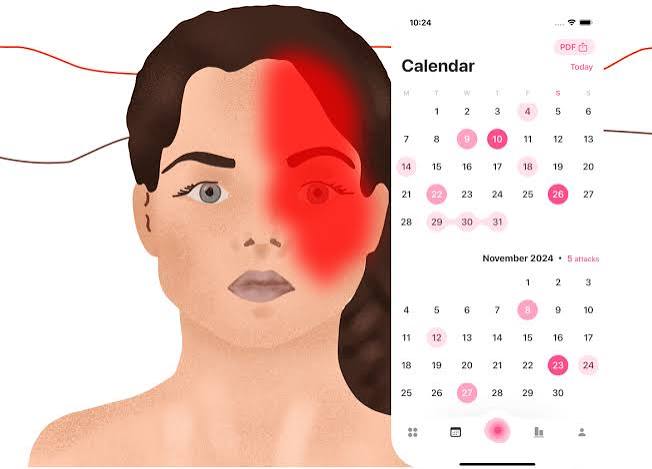
Third, clear pattern views are important. Look for a calendar, trend lines, and a “what happened before the attack” view. A good app does not just show a headache count. It helps you compare attack days against normal days. If it can only display isolated entries, it is not really doing the trigger work.
Fourth, export or sharing should be there. When your app cannot create a clean report for a doctor, it is leaving value on the table. A simple PDF, CSV, or shareable summary can turn months of vague memory into something a clinician can actually use. For example, a 30-day export can show whether attacks cluster after poor sleep or missed meals.
Fifth, reminders should respect real life. Gentle check-ins are useful. Nagging notifications are not. The app should help you remember to log sleep, medication, or symptoms without becoming another source of stress.
Sixth, privacy matters. Migraine logs can reveal menstrual cycles, medications, work schedules, and mental health clues. I would look for a clear privacy policy, passcode or biometric lock if available, and transparency about data sharing. Health data should be handled cautiously, and it is reasonable to ask a clinician for guidance if you are unsure what to share.
Two other things often get ignored. One is offline use, which matters if you need to log while traveling or in a weak-signal place. The other is symptom detail. A serious app should not flatten migraine into a single pain score; aura, nausea, light sensitivity, dizziness, and fatigue can matter just as much.
The Honest Side-by-Side
Here is the comparison I would use if I were narrowing a shortlist.
| Criteria | Simple Migraine Diary | Trigger Tracking App | Winner for [condition] |
|---|---|---|---|
| Logging speed | Usually faster, fewer fields | Slightly slower if it asks for more context | Simple diary for people who will not log unless it takes seconds |
| Trigger analysis | Limited or absent | Built to surface patterns | Trigger tracking app for anyone trying to identify causes |
| Custom tags | Often basic | Usually stronger and more flexible | Trigger tracking app for personal or unusual triggers |
| Doctor-ready summaries | Sometimes minimal | More likely to export usable reports | Trigger tracking app for clinic visits |
| Long-term insight | Good for count and timing | Better for overlap and recurrence patterns | Trigger tracking app for recurring migraines |
| Ease during an attack | Better if extremely simple | Can be worse if the interface is crowded | Simple diary for severe attacks or brain fog |
| Data privacy controls | Varies widely | Varies widely, but more important to inspect | Tie, based on policy rather than category |
| Reminder features | Sometimes basic | Often more developed | Trigger tracking app for habit support |
| Risk of overload | Low | Higher if it is too feature-heavy | Simple diary for minimalist users |
The table gets to the core trade-off: the more an app tries to analyze triggers, the more it asks you to do. That extra effort can pay off, but only if the app stays easy enough to use on migraine days. If it does not, you will stop logging, and the extra features will never matter.
Simple Migraine Diary: Who Should Actually Use This (and Who Shouldn’t)
A simple migraine diary wins for people who need consistency more than analysis. Should your migraines be frequent, severe, or accompanied by fog, nausea, or light sensitivity, a stripped-down diary may be the only thing you can realistically keep up with. Not glamorous. Still useful. Simplicity often beats ambition when your head hurts.
Because the strength of a simple diary is reliability, it usually asks fewer questions, which means you are more likely to open it during or right after an attack. That gives you better record quality. It is also easier to compare over time if your goal is just to know how often attacks happen, when they start, and what medication you used.
Its weakness is obvious: it does not help much with trigger discovery. You can end up with a neat log and no pattern. Should you be trying to figure out whether red wine, poor sleep, or skipping lunch is the bigger problem, a basic diary may leave you stuck. It can also miss subtle context, especially if it does not allow custom tags or notes.
Therefore, I would recommend a simple diary for someone who has never tracked migraines before, for anyone who gets overwhelmed by too many fields, or for a person whose main goal is appointment prep rather than self-analysis. I would not choose it for someone who already suspects multiple triggers and wants a tool to test those suspicions methodically.
This is also the better option if you share a device, hate notifications, or want the lightest privacy footprint possible. Fewer features often means fewer data pathways. That does not make it automatically safer, but it can make the app easier to inspect and manage.
Trigger Tracking App: The Specific Situations Where It Wins
A trigger tracking app wins when the question is not “How many migraines did I have?” but “What seems to come before them?” In that situation, you need the extra structure. A good tracker can help you connect dots you would never remember on your own.
It is especially useful if your attacks seem random. Randomness often hides a pattern that only appears when you look across weeks or months. Maybe the attacks cluster after poor sleep, travel, missed meals, or hormonal shifts. Maybe they follow certain weather changes or screen-heavy workdays. A trigger tracker gives you a way to test those hunches without guessing.
Meanwhile, this is also the better choice if you are seeing a specialist. Doctors can work with patterns, timing, and medication history better than with fuzzy recollection. When the app produces a clear export, it can save time and make the appointment more useful. That matters when your visit window is short and your memory is not.
The downside is that some trigger apps ask too much. Too many prompts can make logging feel like homework. Some also overwhelm users with charts that look scientific but do not answer the question that matters: what should I change next? Should the app give you data without interpretation, it may not help.
Therefore, I would use a trigger tracking app if you are willing to spend a little time each day logging sleep, food, symptoms, and medication, and you want the app to do more than store notes. I would skip it if you know you will resent extra steps or if your attacks are so abrupt that you need the simplest possible input screen.
The Honest Side-by-Side of the Features That Matter Most
If you want to narrow your search, I would focus on the features that change behavior, not the ones that look impressive in screenshots.
- Fast, low-friction entry: This matters more than design. If the app is slow, you will abandon it.
- Custom trigger tags: Essential for personal patterns that do not fit a preset menu.
- Calendar and trend views: Useful for spotting recurrence, cluster days, and delayed effects.
- Medication logging: Critical if you need to see what helps, what does not, and whether you are overusing rescue meds.
- Export/share tools: Very useful for appointments and for getting a second opinion.
- Privacy controls: Important because health logs contain sensitive information.
- Reminders: Helpful if you can tolerate them and want better consistency.
- Offline capability: Worth having if you travel, commute, or often lose signal.
- Symptom detail beyond pain: Aura, nausea, light sensitivity, and fatigue can be just as useful as pain score.
The feature most people overlook is flexibility. A rigid app may look polished, but migraine does not follow a script. The best app is the one that adapts to your life, not the one that forces your life into its default fields.
For general migraine management guidance, I also trust patient resources from the American Migraine Foundation and the National Institute of Neurological Disorders and Stroke:
– American Migraine Foundation: https://americanmigrainefoundation.org/
– NINDS migraine information: https://www.ninds.nih.gov/health-information/disorders/migraine
Our Verdict: Which One to Choose and Why
Choose a trigger tracking app if you are actively trying to identify patterns, can spare a minute or two to log details, and want something you can bring to a clinician. Choose a simple migraine diary if your main need is consistency, speed, and low effort during an attack. Neither if you expect an app to diagnose you, replace medical care, or solve migraines without any changes in sleep, hydration, medication review, or treatment planning.
That is the call I would make. Should your migraines be frequent enough that you are frustrated by uncertainty, the better app is the one that helps you investigate, not just record. Should your migraines be severe enough that extra fields will make you quit, start with the simplest diary you can tolerate and build from there.
When to Reconsider This Choice Entirely
The answer flips in a few situations.
-
You are tracking for a short period only. Should you just need a record before a single appointment, a simple diary may be enough. You do not need a complex system for a temporary job.
-
Your migraines are too severe for detailed entry. Should nausea, pain, or aura make daily logging unrealistic, simplicity wins. A tracker you never open is worse than a plain note.
-
You mainly need medication review, not trigger hunting. Should the real question be whether your current treatment plan is working, a medication-focused diary may be more useful than a trigger-heavy app.
-
You are worried about sensitive data exposure. Should privacy be your first concern, I would favor the app with the clearest data policy and the fewest extras, even if it has fewer analysis tools.
FAQ
Can an app really tell me what triggers my migraines?
It can help you spot patterns, but it cannot prove causation on its own. I would use app data as a clue, then review it with a clinician if the pattern matters clinically.
What should I track first if I do not know where to start?
Track attack date and time, sleep, meals, hydration, stress, menstrual timing if relevant, medication taken, and symptoms like nausea or aura. That gives you a useful baseline without making the app too complicated.
Are expensive migraine apps always better?
No. More features can help, but only if they are easy to use and you will keep logging. A simpler app that you actually use is better than a packed app you quit after a week.
Should I share my migraine log with my doctor?
Yes, if the app can export a clear summary. That can make the visit more efficient and help your clinician see patterns faster.
What is the biggest mistake people make with trigger tracking apps?
They choose an app with too many features and too little speed. The result is incomplete data, which leads to bad conclusions.
